

In web application security testing, the initial Reconnaissance & Mapping Phase sets the foundation for everything that follows. Before you can evaluate an application’s attack surface, you need to uncover the hidden layer powering it: the server-side technology stack.
Server-side fingerprinting is the practice of extracting subtle clues, HTTP headers, file extensions, and behavioral indicators to accurately map out the target’s web server software, backend languages, frameworks, and active modules.
Here is a comprehensive breakdown of how security professionals systematically discover target server technologies.
1. Banner Grabbing & Deep HTTP Fingerprinting
Many web servers run on default configurations that leak fine-grained version information in their HTTP response headers.
**The Server Header Disclosures:**HTTP
Server: Apache/1.3.31 (Unix) mod_gzip/1.3.26.1a PHP/4.3.9 mod_ssl/2.8.20
A single header can expose the core web server, operating system, installed modules, and active scripting engines.
Beyond Banners (Behavioral Fingerprinting):
Administrators often suppress or obscure server headers. However, masking deep server behavior is far more difficult. Automated tools like Httprecon or httprint analyze optional HTTP specification implementations, non-standard header orders, and error-handling quirks to establish an accurate server fingerprint despite obfuscated banners.
2. Extension Analysis & Behavioral Mapping
File extensions in published URLs directly reveal the underlying application platform:
.asp/.aspx— Microsoft Active Server Pages / ASP.NET.jsp/.do— Java Enterprise Edition / JavaServer Pages.php— PHP Engine.cfm— Adobe ColdFusion.pl/.py— Perl / Python Scripts.dll— Compiled Native Code (C/C++)
Extension Handler Probing:
Even when an application uses clean URLs, you can confirm whether specific technology handlers exist on the server by testing custom error handling:
Request a non-existent file with a target extension (e.g.,
test12345.aspx).If ASP.NET is active, the server returns a framework-specific customized error page.
Requesting a non-existent file with an unmapped extension returns a standard server 404 error.
3. Structural Signatures: Cookies & Directory Patterns
Server technologies leave distinct footprints across session management and structural URL design.
Default Session Tokens
Frameworks issue unique session cookie names by default:
Cookie Name Platform / Technology JSESSIONID Java Application Servers ASPSESSIONID Microsoft IIS (Legacy ASP) ASP.NET_SessionId Modern Microsoft ASP.NET PHPSESSID PHP Native Session Engine CFID / CFTOKEN Adobe ColdFusion
Subdirectories & URL Schemes
Directory Clues: Pathways such as
/servlet/,/cfide/,/rails/, or/pls/directly expose backend components like Java Servlets, ColdFusion, Ruby on Rails, or Oracle PL/SQL gateways.Non-Standard Mechanics: Unique URL structures—such as comma-separated number strings (
/news/0,,2-421206,00.html)—frequently pinpoint specific enterprise CMS platforms like Vignette.
4. Third-Party Software & Dependency Risks
Modern platforms rely heavily on third-party integrations, such as shopping carts, authentication handlers, or community forums. Static asset paths, custom HTTP headers, and embedded HTML comments help identify these components.
Once a component is identified, you can:
Query Vulnerability Databases: Search CVE repositories for known exploits affecting that specific software version.
Conduct Offsite Audits: Download or deploy the same component locally to perform static code analysis and test for undiscovered flaws.
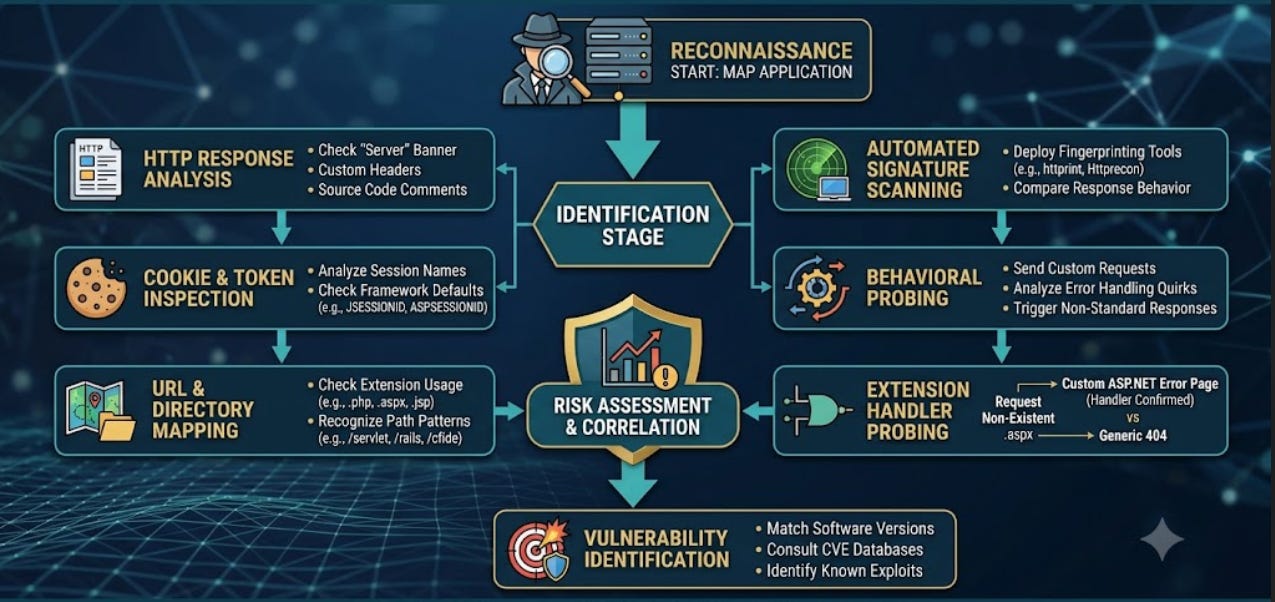
Professional Execution Workflow
Use this step-by-step methodology when mapping target server technologies:
Map Entry Points: Record all endpoints, query parameters, custom HTTP headers, and cookies.
Inspect Banners & Metadata: Analyze
Serverresponse headers, custom headers, and HTML comments.Run Fingerprinting Scans: Deploy tools like
httprintorhttpreconto test behavioral responses.Audit Session Tokens: Check issued cookie names against known framework signatures.
Probe Extension Mappings: Request non-existent files across common extensions to compare generated error responses.
Correlate with CVEs: Cross-reference all identified software versions with known security advisories.
RECAP
please give any suggestion if any improvement