

Finding Hidden Content and Functionality
When assessing a web application’s security, its visible structure alone isn’t enough. Content and functionality that aren’t linked from anywhere within the app often still exist and remain accessible. Here are the main techniques for finding them.
1. Search Engines
Google, Yahoo, and Bing crawl entire sites and keep cached copies — meaning information can persist even after a page is removed. Some useful operators:
site:domain.com — lists all indexed pages for the target
site:domain.com login — keywords like “login” quickly surface sitemaps and admin panels
link:domain.com — external sites linking to the target (including partner links)
related:domain.com — similar sites, some of which occasionally hold extra info
Also: check Groups/News sections in addition to Web results, include “omitted results,” review cached pages, and repeat the same searches across other domains owned by the same organization.
2. Web Archives
The Wayback Machine (archive.org) preserves a site’s history, letting you browse pages and functionality that no longer exist on the live application.
3. Third-Party References
Many apps include restricted functionality meant for business partners, and those partners sometimes mention it on their own sites or forums — even if the target app never links to it itself.
4. Developer Forums
Developers often ask and answer questions on public forums, unintentionally leaking sensitive details like the technology stack, known bugs, or config/log files. Approach:
Compile a list of developer/staff names and contacts (from source code, the website, or the app itself)
Search those names to find forum posts and look for useful clues
5. Web Server Level
Bugs at the web server layer can expose directory listings or raw source code. Many servers also ship with default sample scripts and common third-party components (shopping carts, CMS modules) installed in predictable locations.
Tools like Nikto and Wikto scan for these known files/directories using built-in databases. Keep in mind:
Non-standard locations can usually be specified manually
A custom “404” page can also be configured for detection
These tools can produce false positives/negatives — always verify results manually
Scan by domain name, not IP address (virtual hosting can break link-following otherwise)
6. Application Pages vs. Functional Paths
The techniques above assume a traditional model — one unique URL per function. But some applications route every request to a single URL, using parameters to decide which function actually runs (e.g., a banking app using servlet and method parameters).
In such cases, URL-based mapping becomes almost useless — from the outside, the app looks like it has just one page. What matters here is mapping the functional path instead — the logical flow a user follows, like login → select account → enter amount → confirm.
This matters for two reasons:
Understanding the app’s logic: it reveals the assumptions developers made about user flow — assumptions worth testing and trying to break
Adapting discovery techniques: when functionality is selected via a parameter (e.g., /admin.jsp?action=editUser) rather than a distinct URL, standard content-discovery methods won’t find much. Instead, probe how the app responds to invalid parameter values (unknown servlet/method names) to identify what a “valid” response looks like, then systematically enumerate functions from there.
RECAP
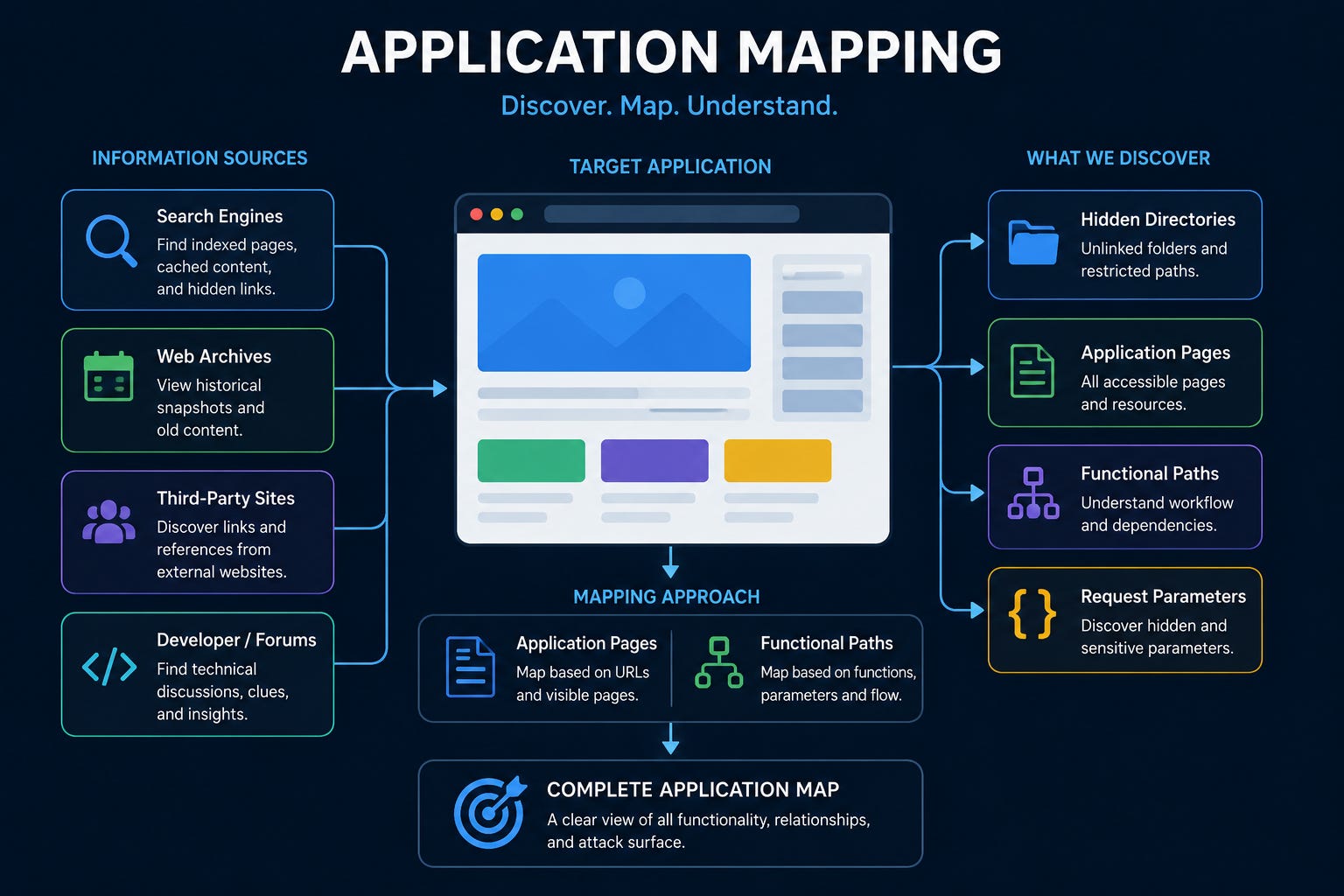
Conclusion
Information from public sources — cached pages, archives, forum posts, or automated scans — significantly helps in understanding an application’s attack surface. Old, unlinked functionality may still be present and may contain vulnerabilities that do not exist elsewhere in the application, and where functionality hides behind parameters, understanding functional paths matters more than mapping pages. This is why reconnaissance is considered one of the first and most important steps in any proper security assessment.
please give suggestion